Android, Apple, Blog, Google, Instagram, iOS, News, Tech Talks

Instagram’s New “CLOSE FRIENDS” Feature is here

Ever wanted to send an Insta Story of your face-mask selfie (or drunk selfie on a bad Tinder date) to just your best friends instead of your entire Instagram following? Well, starting today, you can with Instagram’s newest feature: “Close Friends”.


“With Close Friends, you’ll have the flexibility to share your personal moments with exactly who you want — whether that’s inside jokes with your team or showing off your new relationship to your inner circle,” the company said.

To use the new feature, you first have to designate who you want in your Close Friends list. You have complete control over that list, since no one can request to be added.

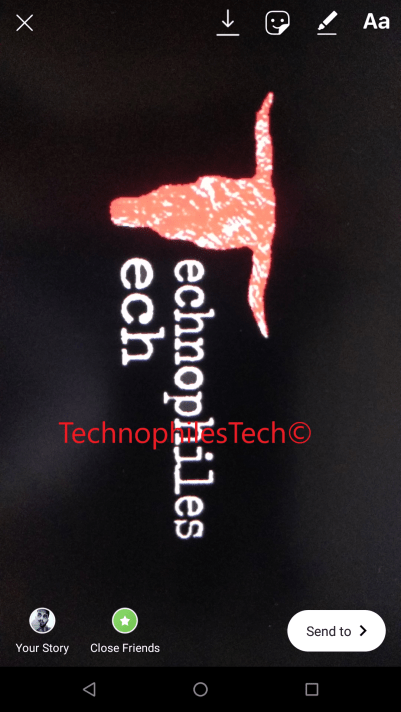
To use, open up the Stories camera and take a photo or video. After you finish your shot, you’ll notice a new green circle with a white star in it. Tap it, and you’ll be brought to the close friends list where you can add people to your inner circle. Instagram will suggest friends to you based on the people you interact with most, or you can use a search box to finish your list. In testing, people typically added around two dozen people, says Robby Stein, product lead at Instagram.

You can also edit the list from your profile page. The list lives in the right-hand panel of your profile, where you can find your Saved posts, Nametag, Your Activity. To access it, simply click on the green “Add” button next to your friend’s handle to include them on your list.

Screenshot_20181201-140602

Now when you go to post a Story, you’ll find a green-starred “Close Friends” button on the bottom left corner of your screen that you can press to send your personal content to your handpicked group — for the moments you want to share but not with your entire following (including you know, your mom’s friend from college or your aunt or your boss).

Screenshot_20181201-135450

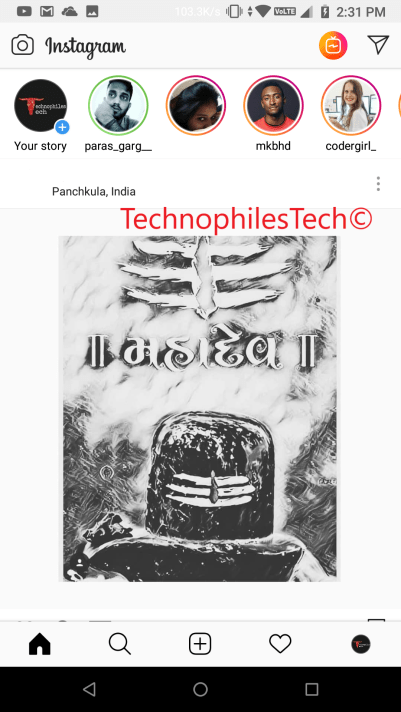
Once you do, your close friends will see a green ring around your story in the tray at the top of the feed. It’s a visual signal that a close friend has shared something more privately with you, and it should stand out from the standard pink-purple gradient rings.

Screenshot_20181201-143150

Friends are never notified that you added them to, or removed them from, your list. Unlike a Finstagram, people can’t request to join your circle of close friends. If they’re on your list, they’ll see the green rings when you post to your close friends; if they’re not, they won’t. But you’ll still maintain “plausible deniability,” Stein says, as most people will simply assume you haven’t posted anything to your close friends group.


Android, Apple, Blog, Instagram, iOS, Tech Talks

Instagram’s ‘Active At’ Feature on Direct Messaging; Screenshot Alerts for Stories Also Coming Soon

Highlights:-

● Instagram added last seen feature in Direct Messaging (DM) Service

● Instagram testing text-only stories and screenshot alerts for stories

Instagram is now even more of a stalker’s paradise.

Everyone’s favorite photo and video sharing app has just added an “Activity Status” that lets all your friends and followers “see when you were last active” on the app, just like on Facebook Messenger.

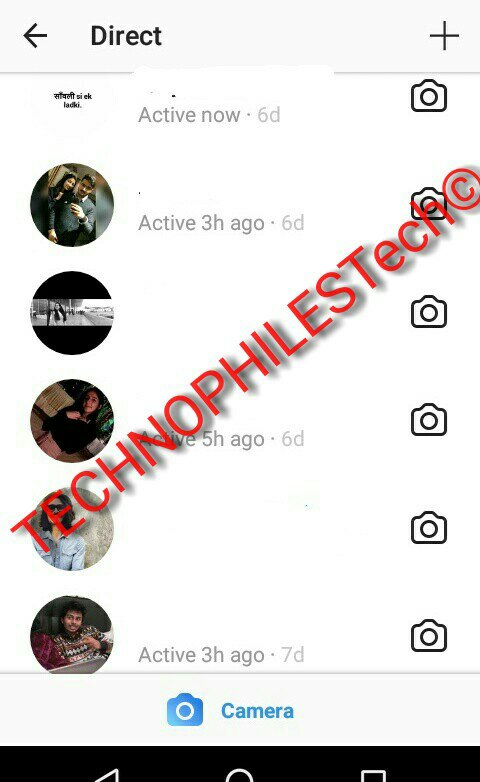
When you open up Instagram Direct, the messaging section of the app, you’ll now see it shows whether your friends are “active” on the app or when they were last active on it.

Interestingly, the feature works even if the person is not following your account. The Activity Status will be shown to accounts you and anyone you message.

For Instagram stalkers — don’t pretend like you don’t do it — this is change that’ll let you keep even closer tabs on who is and isn’t ignoring you on the app.

Did your crush just read your DM (you’ll know because it says “seen” underneath the message) and not respond? Well, by default, you can now see if they’re really ghosting you or not. The new Activity Status is enough to give Instagram addicts even more anxiety .

So Instagram got its own version of “last seen” called “activity status”

Fortunately, there’s a way to stop this creepy activity broadcasting: Go Instagram’s app settings (the gear icon) inside of your profile, and then toggle off the “Show Activity Status.”

This slideshow requires JavaScript.

“When this is turned off, you won’t be able to see the activity status of other accounts.”

Apart from that, Facebook owned – Instagram is testing a new ‘Type’ feature that enables text-only, written stories on the mobile app. While Instagram Stories have always been based on images and video, Instagram has been testing the new Type feature that apparently shows up next to other choices such as Boomerang, Rewind, and Superzoom. Users can choose from different fonts, different backgrounds, and even apply filters on Type. Screenshots of some of the Fonts and Colors that I was able to use are attached here.👇

This slideshow requires JavaScript.

Another report from WABetaInfo suggests Instagram is testing out a security feature on its app. The feature will send notifications to users if someone takes a screenshot of their stories. Instagram currently notifies users of a screenshot only if the image or video is sent on Instagram Direct. Now, like Snapchat, the feature will be expanded to public stories as well.

As Instagram becomes ever more popular, it’s also becoming more and more like Facebook, and that’s, to be honest, kind of scary. The reason why Instagram was great was because it wasn’t Facebook. It didn’t have creepy activity status trackers.

But now that it does, it might be time to consider deleting Instagram off your phone, just like people are doing with the Facebook app.

Deleting Instagram is the new deleting Facebook!!!

If you like our post please share our post!!!

Follow us on Instagram

and Facebook

Android, Blog, iOS, Tech Talks

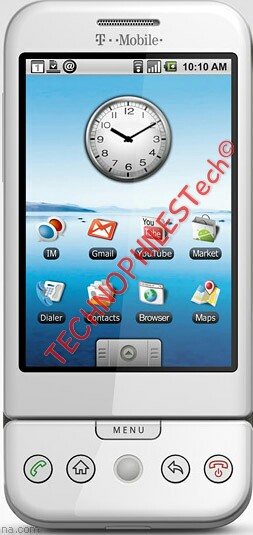
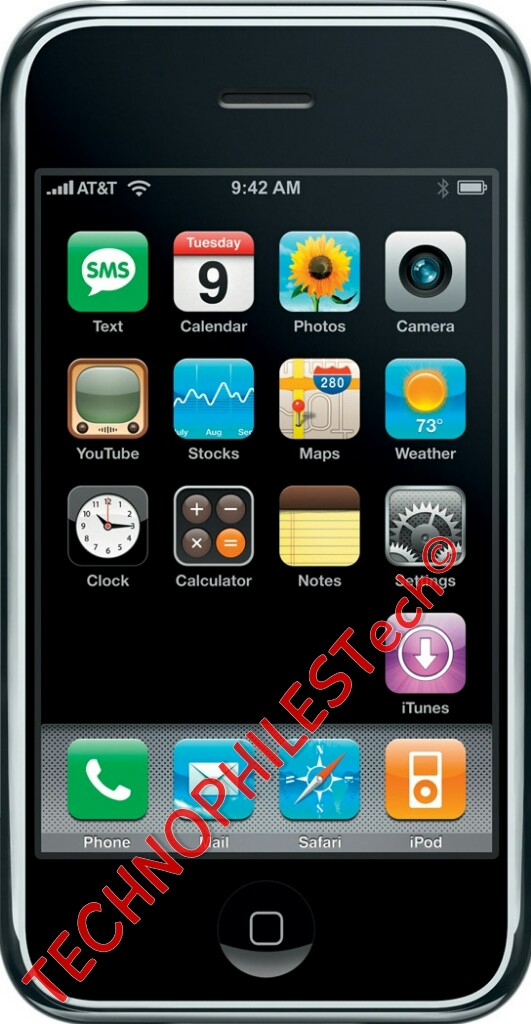
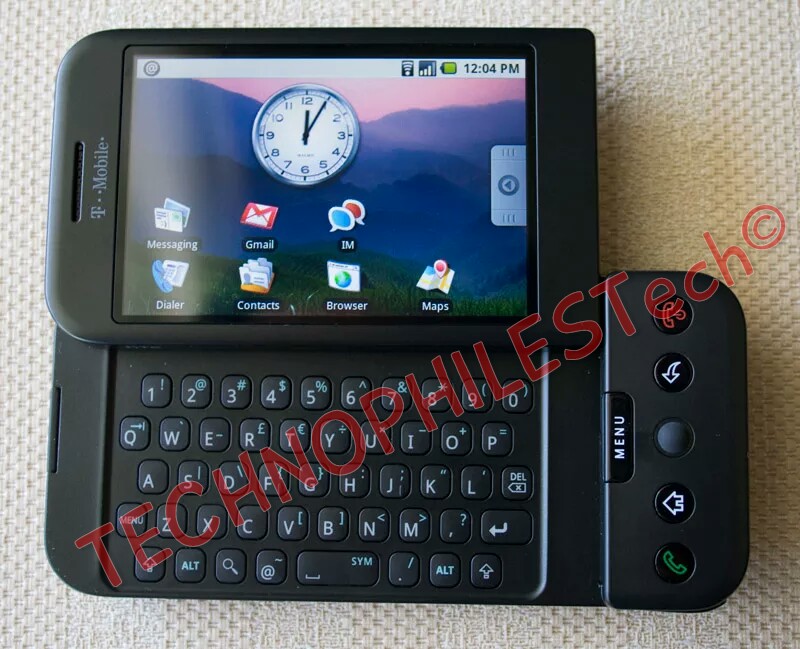
First Android Phone (Android Alpha) v/s First iPhone (iOS 1)

Today we all have these massive phones with big and sharp displays packed in with all these crazy features but did u ever thought what did the originals looked like? Steve Jobs considered android as a stolen product and wanted to destroy android for copying the iPhone. So let’s see which one was better at that time and who copied who (will get to that later read till the end!).

Display:

Talking first about the display both these devices had a big or massive displays (Massive by 2008 standards) (let’s not forget about Nokia and Moto phones popular as smartphones at that time). The first version of iPhone was quite big with a 3.5 inch display. On the other hand Google G1 had a smaller display that was a 3.2 inch display but both of them had the same resolution of 320×480 which meant that Google G1’s display had more PPI. On the other hand Google G1 display had a TFT panel due to which it looked weird and had bad viewing angles while iPhone was using the HVGA which looks much nicer than what was found on G1.

Design and Hardware:

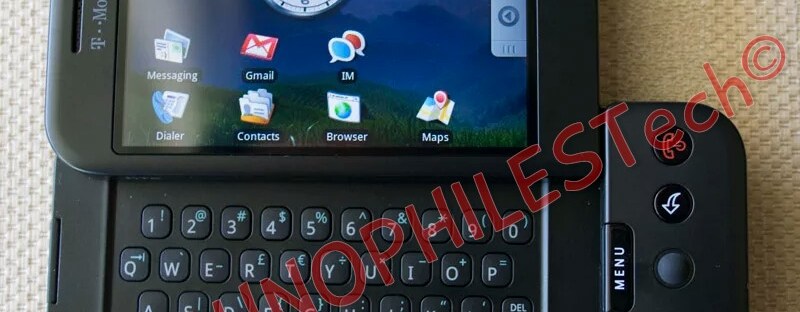
The iPhone and the G1 had a night and day difference in terms of hardware. The iPhone was twice as thin as its competitor. iPhone had only one input method whereas G1 couldn’t actually make up its mind what it wanted to be- it wanted to be fully touch screen phone or it wants to be navigated like a blackberry with scroll wheel or an actual keyboard to control only some things like typing when you get bored with other two of them. It did seem like an identity crisis because it really didn’t know what it really was but still people loved to have so many choices whereas apple on the other hand used only a touch display for everything and had no stylus like the one found on the Note series these days. On the iPhone there was a tiny or miniscule 2MP camera on the back with the bottom made up of plastic with the antenna bands. The back was non removable whereas G1 had a removable back and it could accept a SD card of 8 GB. The feature which today the iPhone7 doesn’t have was present on the earlier versions of iPhone ….. Yes I am talking about the headphone jack. The first iPhone had a built in headphone jack. Yay no adapters! But take that back actually you did need one because it was recessed so that one could use only apple-branded earphones. G1 did had a unique design which made it look like a J-shaped device and made it more comfortable in hand but it couldn’t stand the test of time like the iPhone.

Software:

Even though iPhone won the hardware race with its nice design by quite a margin but the winner of the software race is simply android because of its more advanced features. This thing was pretty crazy that on android you couldn’t set a lock screen wallpaper whereas on the iPhone you couldn’t set the background of the home screen(it had a plain black background). You could even set a pattern unlock on the android. One more thing which the iPhone didn’t had at that time was pages. If you tap on any app it would simply open the app whereas if you do so on android one could simply move and rearrange the apps as per your liking and create new pages. Multitasking which we take for granted these days didn’t even existed at that time on the iPhone which works very well on the newer versions. This where android steps up as there was a way to multitask in the G1 by pressing and holding the home button. One more thing which didn’t exist at that time were personal assistants-no Siri, no Google Assistant. Also the very first version of android didn’t have an app drawer where all the apps were organized. There was no notification center on the first ever iOS whereas android had a built in notification center. Adding widgets, changing wallpapers, adding app shortcuts-customization like these were only on android at that moment. One biggest thing iPhone didn’t had at that time was the app store. G1 did came with a play store which was known as ‘Market’ at that time.The first ever version of android didn’t have a virtual keyboard which did came in later versions of android. Even though virtual keyboard came later, it just didn’t feel good, nice and natural as the iPhone’s virtual keyboard felt.

Now the thing I was talking about in the starting. Rumors were that Google tried to copy apple’s iPhone design. The first design that came out before they saw the iPhone was similar to what Blackberry, Nokia etc. phones looked like- a small 1.0 inch display with a QWERTY keyboard at the bottom and all business feature like mail to call it a smartphone of that time. But when they saw the original iPhone they just came to know that their blackberry rip-off couldn’t compete with the iPhone so they had to go ahead and re imagine and bring a touch screen to it.

I hope you enjoyed this long journey into the past where we all learnt how the first version of smartphones which we use today looked like….

Please hit that like button if you liked the article and do share it with your friends and do check out our blog for other amazing articles.

Blog, Tech Talks

Ransoc – An unusual ransomware that threatens to expose your personal information

MOSTLY a ransomware encrypts YOUR Files and demands money in exchange for a key that can decrypt the data. And the payment is demanded in Bitcoins. Ransoc is different in the way it works and the medium it uses for the payment.

How does Ransoc work?

Once your computer is infected by Ransoc, it gathers your personal information from your Skype and social media profiles and scans your system for Torrent files and other sensitive information. It then displays a ransom note. Interestingly, the ransom note is customized for a particular user and has their social media details including their profile picture. The ransom note threatens the victim with a fake legal proceeding and also that the ‘sensitive’ information found on their computer will be made public if the ransom is not paid.

Now, some mportantt points to note here:

  • Ransoc, unlike other ransomware, does not encrypt any files on the infected computer.
  • Reportedly, the ransom note is displayed only in a case where the ‘sensitive’ information found by the ransomware includes child pornography or illegally downloaded Torrent media files.

    So basically, the creators of this ransomware are targeting the victim’s fear of facing legal complications and losing their reputation instead of their data.

    Further, where all ransomware creators use Bitcoin to remain hidden from law enforcement, Ransoc asks its victims to pay via credit card; this kind of payment approach has been unheard of in ransomware attacks till now.

    How to stay safe from ransomware attacks

    • Never click on links or download attachments that arrive in emails from unwanted, unknown or unexpected sources.
    • Apply all recommended security updates (patches) to your Operating System, and programs like Adobe, Java, web browsers, etc.
    • Take regular backups of your files. Remember to disconnect the Internet when you are backing up on a hard drive. Unplug the drive before you go online again.
    • Avoid using outdated browser plugins or plugins that you do not use anymore.
    • Invest in an antivirus software that comes with several layers of security such as Web Security that blocks infected websites, Email Security that blocks infected emails, Phishing Protection that blocks fake websites, etc.
    • Always keep your antivirus software up-to-date to stay safe against new threats.
    Blog, Tech Talks

    What happens to the deleted files?

    Have you ever thought what happens to the files and data you delete? Where does it go? Is it gone forever?
    Deleting is like forgetting about something for humans but how does a computer forget things? Moving files to a trash is just a starting. To prevent accidental deletions a file deleted remains in your trash or recycle bin, in a temporary directory a sort of isolation from the other files on your computer. It can be restored from the trash bin if you wish but If you empty the bin where does the files disappear or go?

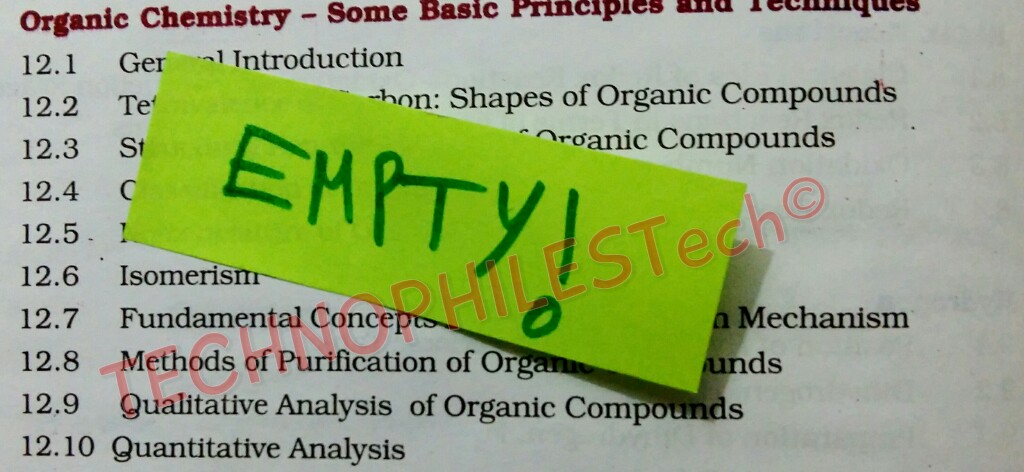
    Marked Empty but the contents still exist.

    Actually a file deleted is not actually deleted it is just marked as EMPTY! The files does not show anywhere on the pc but the fact is that it hasn’t moved out either only the pointers are gone away. Pointers are another type of data on your drive that point to places in memory where the actual file they are referencing  can be found. They are like a table of contents which means on most operating systems deleting a file or emptying the trash is like deleting a chapter from a book. It’s like turning to the table of contents and marking it as empty. Like there is nothing here but it actually is there hidden in some sort of way.

    wp-1480759629480.jpg
    Therere special data recovery tools that look through the memory and mark empty data as AVAILABLE. If u get lucky they can even find a file and save it. Bring it back from dead, basically undelete it. So you must be wondering now if the data is not deleted then why don’t you run out of space on your drive. Well those files which are marked as empty are overwritten. Yes OVERWRITTEN!

    If you want to delete a file completely without it being recovered back. You will need to overwrite the unwanted file completely. Overwrite it, corrupt it’s data so it’s completely gone once for all. One complete overwrite of that data should be fine but some people do over 30 overwrites but even 30 overwrites might not be enough to completely erase a file because of bad sectors. Now what are bad sectors, they are parts of the drive that devices can’t access beacause of failed transistors or physical damage so an overwrite won’t be able to reach them meaning that any data that was stored there remains there. So if that’s a confidential file and you want to completely get rid of it. You need to destroy that drive physically or maybe burn it.

    So if u want to perform a complete delete to a file destroy the drive. I mean literally destroy it burn it or time will do it for you . Scientists believe in billions of years the universe will witness dark era and eventually sun will become big enough to swallow earth as as whole and universe will come to an end that means end to any file, photo even you and actually everything ever created! But that will happen  in a very very long time.

    Blog, Tech Talks

    Reliance Jio’s Happy New Year offer: Free services until March 31, 2017

    HIGHLIGHTS

    • Reliance Jio’s existing and new customers will have free service till March 31.
    • New users can avail of this free offer from December 4.
    • This new offer is being called the ‘Jio Happy New Year offer.’

    Existing and new Reliance Jio users will be able to use data, voice, video and all of Jio’s applications for free until March 31, 2017.

    All existing customers who already have free service until December 31, 2016, will see this deal extended to them from January 1 to March 31, 2017, and all new customers can avail of this deal from December 4, said Reliance Industrieschairman Mukesh Ambani in an announcement today.

    Reliance is calling this the ‘Jio Happy New Year’ offer.

    “In this period, customers will also be able to test-drive digital recharge, billing experience, using JioMoney wallet,” said Reliance Industries chairman Mukesh Ambani at an event today.

    Ambani said Jio has also “fine-tuned” its fair usage policy to ensure all users get fair share of network capacity.

    He added that since it Jio started operations, as many as 900 crore voice calls from Jio to the networks of its 3 largest competitors “were blocked.”

    Despite that, “in the first three months of its operation, Reliance Jio has grown faster than global tech giants Facebook, WhatsApp or Skype, ” said Ambani, in an address today.

    “In 83 days Jio has crossed 50 million customers…Jio is now the fastest growing tech firm,” Ambani said.

    He added that the benefits of Jio’s superior technology have been denied to customers “due to anti-competitive behaviour of incumbent operators.”

    Ambani also congratulated Prime Minister Narendra Modi for his “bold and historic decision” to ban high denomination currency.

    Blog, Science, Tech Talks

    Inside tiny tubes, water turns solid when it should be boiling

    ​MIT researchers discover astonishing behavior of water confined in carbon nanotubes.

    David L. Chandler | MIT News Office 

    A team at MIT has found an unexpected discovery about water: Inside the tiniest of the spaces – in carbon nanotubes whose inner dimensions are not much bigger than a few water molecules – water can freeze solid even at high temperatures that would normally set it boiling. The finding might lead to new  applications such as ice-filled wires.

     

                           (Credits :MIT)
    It’s a well-known fact that water, at sea level, starts to boil at a temperature of 212 degrees Fahrenheit, or 100 degrees Celsius. And scientists have long observed that when water is confined in very small spaces, its boiling and freezing points can change a bit, usually dropping by around 10 C or so.

    But now, a team at MIT has found a completely unexpected set of changes: Inside the tiniest of spaces — in carbon nanotubes whose inner dimensions are not much bigger than a few water molecules — water can freeze solid even at high temperatures that would normally set it boiling.

    The discovery illustrates how even very familiar materials can drastically change their behavior when trapped inside structures measured in nanometers, or billionths of a meter. And the finding might lead to new applications — such as, essentially, ice-filled wires — that take advantage of the unique electrical and thermal properties of ice while remaining stable at room temperature.

    The results are being reported today in the journal Nature Nanotechnology, in a paper by Michael Strano, the Carbon P. Dubbs Professor in Chemical Engineering at MIT; postdoc Kumar Agrawal; and three others.

    “If you confine a fluid to a nanocavity, you can actually distort its phase behavior,” Strano says, referring to how and when the substance changes between solid, liquid, and gas phases. Such effects were expected, but the enormous magnitude of the change, and its direction (raising rather than lowering the freezing point), were a complete surprise: In one of the team’s tests, the water solidified at a temperature of 105 C or more. (The exact temperature is hard to determine, but 105 C was considered the minimum value in this test; the actual temperature could have been as high as 151 C.)

    “The effect is much greater than anyone had anticipated,” Strano says.

    It turns out that the way water’s behavior changes inside the tiny carbon nanotubes — structures the shape of a soda straw, made entirely of carbon atoms but only a few nanometers in diameter — depends crucially on the exact diameter of the tubes. “These are really the smallest pipes you could think of,” Strano says. In the experiments, the nanotubes were left open at both ends, with reservoirs of water at each opening.

    Even the difference between nanotubes 1.05 nanometers and 1.06 nanometers across made a difference of tens of degrees in the apparent freezing point, the researchers found. Such extreme differences were completely unexpected. “All bets are off when you get really small,” Strano says. “It’s really an unexplored space.”

    In earlier efforts to understand how water and other fluids would behave when confined to such small spaces, “there were some simulations that showed really contradictory results,” he says. Part of the reason for that is many teams weren’t able to measure the exact sizes of their carbon nanotubes so precisely, not realizing that such small differences could produce such different outcomes.

    In fact, it’s surprising that water even enters into these tiny tubes in the first place, Strano says: Carbon nanotubes are thought to be hydrophobic, or water-repelling, so water molecules should have a hard time getting inside. The fact that they do gain entry remains a bit of a mystery, he says.

    Strano and his team used highly sensitive imaging systems, using a technique called vibrational spectroscopy, that could track the movement of water inside the nanotubes, thus making its behavior subject to detailed measurement for the first time.

    The team can detect not only the presence of water in the tube, but also its phase, he says: “We can tell if it’s vapor or liquid, and we can tell if it’s in a stiff phase.” While the water definitely goes into a solid phase, the team avoids calling it “ice” because that term implies a certain kind of crystalline structure, which they haven’t yet been able to show conclusively exists in these confined spaces. “It’s not necessarily ice, but it’s an ice-like phase,” Strano says.

    Because this solid water doesn’t melt until well above the normal boiling point of water, it should remain perfectly stable indefinitely under room-temperature conditions. That makes it potentially a useful material for a variety of possible applications, he says. For example, it should be possible to make “ice wires” that would be among the best carriers known for protons, because water conducts protons at least 10 times more readily than typical conductive materials. “This gives us very stable water wires, at room temperature,” he says.

    The research team also included MIT graduate students Steven Shimizu and Lee Drahushuk, and undergraduate Daniel Kilcoyne. The work was supported by the U.S. Army Research Laboratory and the U.S. Army Research Office through the MIT Institute for Soldier Nanotechnologies, and Shell-MIT Energy Initiative Energy Research Fund.
     “Reprinted with permission of MIT News”

    http://news.mit.edu/

    http://news.mit.edu/2016/carbon-nanotubes-water-solid-boiling-1128

    Blog, Science, Tech Talks

    Parallel Universes DO Exist And Are Already Reaching Out To Us, Scientists Confirm!

    In order to put forth tangible proof that backs the multiverse or ‘Many Worlds’ theory, scientists have finally confirmed that parallel universes exist and that they have already started interacting with ours. 

    Scientist Howard Wiseman of Griffith University, Australia, is spearheading a project that proposes a landmark theory suggesting that these parallel universes operate in the same time and space as our own. What’s even more interesting is that they are interacting with ours on a quantum level, as reported by IFL Science.

    The multiverse theory debunks the 20th-century single verse theory that suggested only one universe existed. However, the 'Many Worlds' theory proposes to explain the inexplicable aspects of quantum mechanics - a field of physics that deals with the structure and behaviour of matter as well as our physical world at the small scale of fundamental mechanics. 

    However, even the ‘Many Worlds’ theory doesn’t show the interaction between these universes. According to its traditional interpretation, several universes came to life after a celestial event occurred – like an asteroid hitting the Earth. 

    The alternative and a more believable theory is that of the ‘Many Interacting Worlds’ theory that suggests that these worlds not only overlap but constantly connect with one another in the same space and time.

    While some researchers think this is a ‘huge waste of time’, others have called it a ‘very nice analysis’. But if the ‘Many Interacting Worlds’ theory holds true, we are in for many worlds of surprise!


    Blog, Tech Talks

    Xiaomi Mi 5c specs reportedly leak, announcement to take place on December 6


    The phone is set to start at CNY 999, which means about $144 or €136. That’s a decent price, especially considering that this device will be part of the Mi 5 line.

    That said, don’t expect specs similar to those of the Mi 5s. The Mi 5c will be a lower-end alternative, and  an alleged spec sheet for it has been leaked in China.

    It tells us that the Xiaomi Mi 5c will have a 5.5-inch touchscreen with narrow bezels, a 2.2 GHz octa-core processor, 3GB of RAM, 64GB of storage, and NFC support. Its main camera will be a 12 MP unit, while an 8 MP shooter will take care of selfies. The phone will run MIUI 8, probably atop Android 6.0 Marshmallow. The CPU will probably have Cortex-A53 cores, and it’s said that this might even be an SoC made in-house by Xiaomi. Take that with a pinch of salt though.

    Past leaks have shown a handset with a fingerprint sensor on the front, and 2.5D glass on top of its screen.